Free classic invoice template: black and white, HTML to PDF
Published 2 min read
Free template
Use this template for free
Create a free account, make a new template in the Code mode and paste the HTML below. Then send your own data from the API.
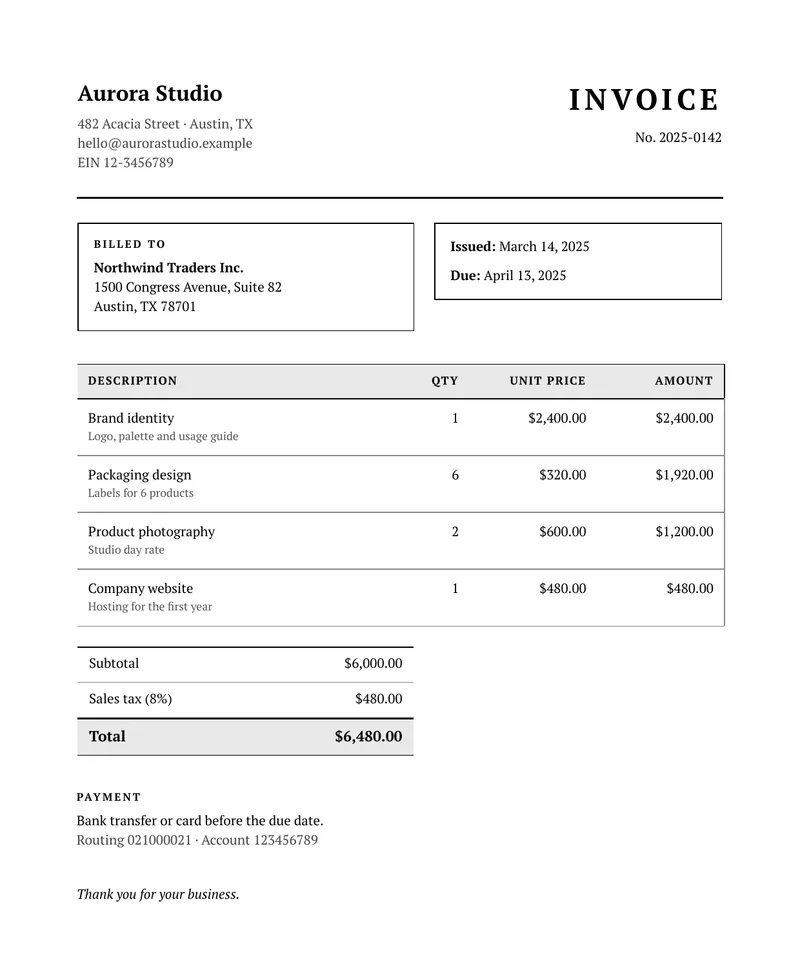
This is the classic style: a serif typeface, black and white, thin rules and a boxed table. It looks the same on any printer, in color or in black and white, and it suits formal documents. It is a complete invoice you can use as it is or change: plain HTML and CSS with placeholders, so it works in any system that can send a request. You fill the placeholders with your data and get a PDF back. Below you can download the sample PDF, copy the code and see the data it expects.
What is in the template
- The company block with name, address and tax number.
- The document title and number.
- A billed-to block with the customer, and the issue and due dates, written in the long form of the reader’s language.
- A table of line items with quantity, unit price and amount. It grows with your data, and its header row repeats if the table runs onto another page.
- Subtotal, tax and total, with the currency formatted for the locale.
- A payment note and a thank-you line.
How to use it
In the portal. Create a free account, click New template, switch to the Code mode and paste the HTML below. You get a live preview.
From the API. Download the HTML and the sample data and send both in one request. This example uses jq to put the files in the body:
curl -X POST https://api.rustedf.com/v1/render \ -H "Authorization: Bearer $RUSTEDF_KEY" \ -H "Content-Type: application/json" \ -d "$(jq -n --rawfile html invoice-classic.html --slurpfile data invoice-classic-data-en.json \ '{html: $html, data: $data[0], locale: $data[0].locale}')" \ -o invoice.pdfOnce you like the result, save the HTML as a template and call it by its id from your code.
Make it yours
- Look. The grays of the header row and of the totals are plain hex colors in the CSS. Change them, or make them white, to print with less ink.
- Amounts. Send them as strings, such as
"6480.00". Work the subtotal, the tax and the total out in your own system and send the results. - Logo. Add your logo as
<img src="asset:<id>" width="120">after uploading a PNG or JPEG once. - Fonts. The template names
PT Serif, and any Google Fonts family works by name; there is nothing to link. - Language. Every label comes from the
tobject of the data, so the same template issues documents in any language you can write.
A note on what an invoice is
This is a commercial invoice layout. The tax and legal requirements for invoices differ by country, and an electronic tax document issued under a national scheme is a different thing. Check what applies to you before you send it to a customer.
Other styles
The same data works with the other styles of this document:
See Templates / Locales and formatting.
The template code
<!doctype html>
<html>
  <head>
    <meta charset="utf-8" />
    <style>
      @page { size: A4; margin: 18mm; }
      body { font-family: "PT Serif", serif; font-size: 10pt; color: #000000; line-height: 1.45; }
      table { width: 100%; border-collapse: collapse; }
      td, th { vertical-align: top; }
      .muted { color: #444444; }
      p { margin: 0; }

      .name { font-size: 16pt; font-weight: bold; margin-bottom: 1.5mm; }
      .kind { font-size: 22pt; font-weight: bold; text-transform: uppercase; letter-spacing: 3pt; text-align: right; }
      .ref { text-align: right; margin-top: 2mm; }
      .rule { border-top: 2px solid #000000; margin: 6mm 0 6mm 0; }

      .box { border: 1px solid #000000; padding: 3.5mm 4mm; }
      .label { font-size: 8pt; font-weight: bold; text-transform: uppercase; letter-spacing: 1.4pt; margin-bottom: 1.5mm; }

      .items { margin-top: 8mm; border: 1px solid #000000; }
      .items th { background: #e9e9e9; border: 1px solid #000000; padding: 2.2mm 2.5mm; text-align: left; font-size: 8.5pt; text-transform: uppercase; letter-spacing: 0.8pt; }
      .items td { border: 1px solid #8a8a8a; padding: 2.6mm 2.5mm; }
      .items small { display: block; color: #555555; font-size: 8.5pt; }
      .right { text-align: right; }

      .totals { width: 52%; margin-left: 48%; margin-top: 5mm; border: 1px solid #000000; }
      .totals td { padding: 2mm 3mm; border-bottom: 1px solid #8a8a8a; }
      .totals .grand td { background: #e9e9e9; font-weight: bold; font-size: 11pt; border-bottom: 0; border-top: 2px solid #000000; }

      .pay { margin-top: 9mm; }
      .thanks { margin-top: 9mm; font-style: italic; }
      .items th.right { text-align: right; }
    </style>
  </head>
  <body>
    <table>
      <tr>
        <td style="width: 55%">
          <p class="name">{{ company.name }}</p>
          <p class="muted">{{ company.line1 }}<br />{{ company.line2 }}<br />{{ company.tax }}</p>
        </td>
        <td>
          <p class="kind">{{ t.title }}</p>
          <p class="ref">{{ t.number }} {{ number }}</p>
        </td>
      </tr>
    </table>

    <div class="rule"></div>

    <table>
      <tr>
        <td style="width: 52%; padding-right: 5mm">
          <div class="box">
            <p class="label">{{ t.billed_to }}</p>
            <p><strong>{{ customer.name }}</strong><br />{{ customer.line1 }}<br />{{ customer.line2 }}</p>
          </div>
        </td>
        <td>
          <div class="box">
            <p><strong>{{ t.issued }}:</strong> {{ issued | date(style="long") }}</p>
            <p style="margin-top: 2.5mm"><strong>{{ t.due }}:</strong> {{ due | date(style="long") }}</p>
          </div>
        </td>
      </tr>
    </table>

    <table class="items">
      <thead>
        <tr>
          <th style="width: 50%">{{ t.description }}</th>
          <th class="right" style="width: 12%">{{ t.qty }}</th>
          <th class="right" style="width: 19%">{{ t.unit }}</th>
          <th class="right" style="width: 19%">{{ t.amount }}</th>
        </tr>
      </thead>
      <tbody>
        {% for item in items %}
        <tr>
          <td>{{ item.name }}<small>{{ item.detail }}</small></td>
          <td class="right">{{ item.qty | number }}</td>
          <td class="right">{{ item.unit | currency(code=currency) }}</td>
          <td class="right">{{ item.amount | currency(code=currency) }}</td>
        </tr>
        {% endfor %}
      </tbody>
    </table>

    <table class="totals">
      <tr>
        <td>{{ t.subtotal }}</td>
        <td class="right">{{ subtotal | currency(code=currency) }}</td>
      </tr>
      <tr>
        <td>{{ t.tax }} ({{ tax_rate | number(digits=0) }}%)</td>
        <td class="right">{{ tax | currency(code=currency) }}</td>
      </tr>
      <tr class="grand">
        <td>{{ t.total }}</td>
        <td class="right">{{ total | currency(code=currency) }}</td>
      </tr>
    </table>

    <div class="pay">
      <p class="label">{{ t.payment }}</p>
      <p>{{ payment.line1 }}</p>
      <p class="muted">{{ payment.line2 }}</p>
    </div>

    <p class="thanks">{{ t.thanks }}</p>
  </body>
</html>
The sample data
{
  "locale": "en-US",
  "currency": "USD",
  "number": "2025-0142",
  "issued": "2025-03-14",
  "due": "2025-04-13",
  "tax_rate": 8,
  "company": {
    "name": "Aurora Studio",
    "line1": "482 Acacia Street · Austin, TX",
    "line2": "[email protected]",
    "tax": "EIN 12-3456789"
  },
  "customer": {
    "name": "Northwind Traders Inc.",
    "line1": "1500 Congress Avenue, Suite 82",
    "line2": "Austin, TX 78701"
  },
  "items": [
    { "name": "Brand identity", "detail": "Logo, palette and usage guide", "qty": 1, "unit": "2400.00", "amount": "2400.00" },
    { "name": "Packaging design", "detail": "Labels for 6 products", "qty": 6, "unit": "320.00", "amount": "1920.00" },
    { "name": "Product photography", "detail": "Studio day rate", "qty": 2, "unit": "600.00", "amount": "1200.00" },
    { "name": "Company website", "detail": "Hosting for the first year", "qty": 1, "unit": "480.00", "amount": "480.00" }
  ],
  "subtotal": "6000.00",
  "tax": "480.00",
  "total": "6480.00",
  "payment": {
    "line1": "Bank transfer or card before the due date.",
    "line2": "Routing 021000021 · Account 123456789"
  },
  "t": {
    "title": "Invoice",
    "number": "No.",
    "billed_to": "Billed to",
    "issued": "Issued",
    "due": "Due",
    "description": "Description",
    "qty": "Qty",
    "unit": "Unit price",
    "amount": "Amount",
    "subtotal": "Subtotal",
    "tax": "Sales tax",
    "total": "Total",
    "payment": "Payment",
    "thanks": "Thank you for your business."
  }
}Keep reading
More styles
Google Fonts in a PDF: use font-family without @font-face
Use any Google Fonts family in a PDF by naming it in CSS. How the font is fetched and cached, the built-in fallbacks, bold and italic, and what does not work.
3 min read
More styles
Free classic receipt template: black and white, HTML to PDF
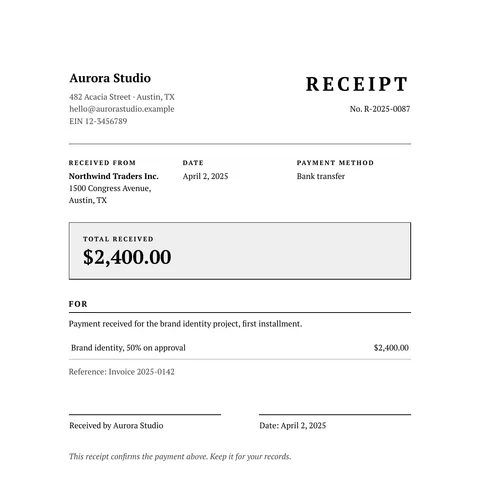
A free classic receipt in HTML and CSS: serif type, a double frame, the payer, the amount received and a signature line. Copy it and use your own data.
2 min read
More styles
Free classic quote template: black and white, HTML to PDF
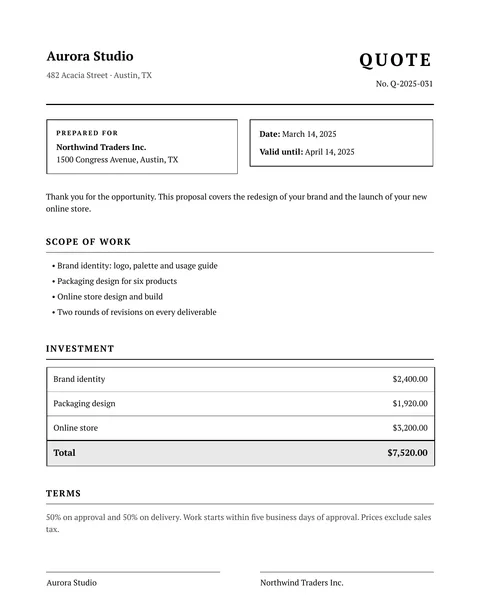
A free classic quote in HTML and CSS: serif type, black and white, scope of work, a price table, terms and signature lines. Copy it and use your own data.
2 min read
More styles
Free modern invoice template with a colored header, HTML to PDF
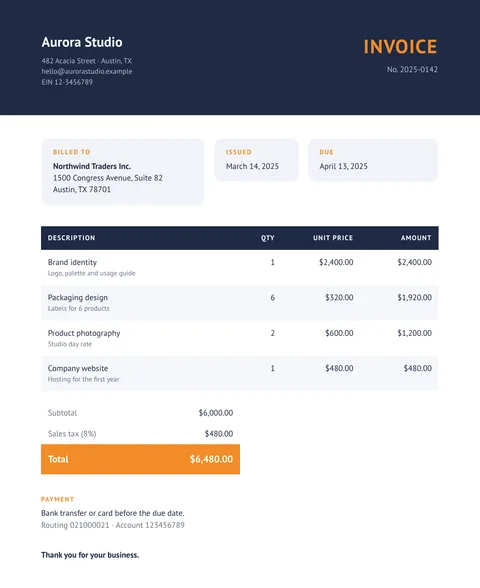
A free modern invoice in HTML and CSS: a dark header band, rounded cards, striped rows and an accent color for the total. Copy it and use your data.
2 min read